Close Menu
    Facebook X (Twitter) Instagram
    Trending
    • Hidden Costs of Exotic Weed Strains: Buyer Risks in 2026
    • Can native turf grass mixes withstand heavy drought and summer heat restrictions?
    • Could Your Baby Shower Venue Compromise Security?
    • The Hardest Riddles in the World — With Answers
    • How to Write a Proper Email: A Practical Guide to Emails That Get Read and Acted On
    • AI for Graphic Design: What It Can Do, What It Can’t, and What It Changes
    • Digital approval systems used in crypto casino funding
    • Discover Quality Used Vehicles With Trusted Toyota Experts
    • Contact Us
    • About Us
    The Holborn Mag
    Friday, June 12
    • Tech
    • Business
    • Health
    • Auto
    • Fashion
    • Pet
    • Home
    The Holborn Mag
    Home»Tech»What is Cycle Count in iPhone? (And Why It Matters)
    Tech

    What is Cycle Count in iPhone? (And Why It Matters)

    Oscar AndersonBy Oscar AndersonMay 22, 2026Updated:May 22, 2026No Comments3 Mins Read
    Facebook Twitter Pinterest LinkedIn Tumblr Email
    Share
    Facebook Twitter LinkedIn Pinterest Email

    If you’ve ever wondered what is cycle count in iphone, it refers to the number of complete charge cycles your battery has gone through. One full cycle equals charging from 0% to 100%, but it does not have to happen all at once; for example, charging from 50% to 100% twice counts as one cycle.

    Apple designs iPhone batteries to retain up to 80% of their original capacity at 500 charge cycles for most models (1000 cycles for iPhone 15 and later). Once you pass those thresholds, battery health degrades faster and you may notice shorter battery life.

    How to Check Cycle Count on iPhone

    Apple does not show cycle count directly in Settings for most iPhones. Here are your options:

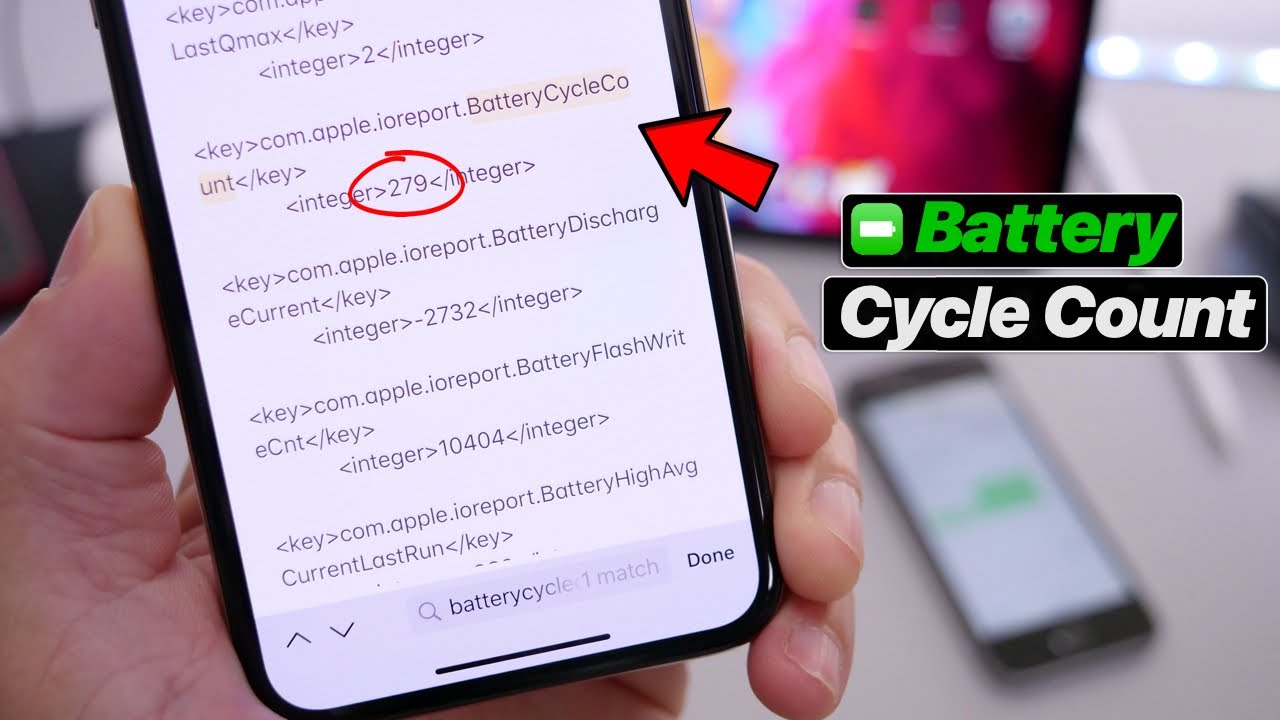
    1. Go to Settings > Privacy & Security > Analytics & Improvements > Analytics Data.
    2. Look for a file starting with ‘Analytics’ followed by today’s date.
    3. Open the file and search (Ctrl+F or scroll) for the term ‘cyclecount’.
    4. The number next to it is your battery cycle count.

    Alternatively, on Mac: Connect your iPhone, open System Information (About This Mac > More Info > System Report), navigate to USB, select your iPhone, and look for ‘Cycle Count’ in the details panel.

    Battery Health vs Cycle Count

    Cycle Count Estimated Battery Health What You Might Notice Action Needed?
    0 – 200 95% – 100% Normal battery life No action needed
    200 – 400 88% – 95% Slightly shorter battery life Monitor only
    400 – 500 80% – 88% Noticeable drain, may throttle Consider replacement soon
    500 – 800 Below 80% Significant drain, shutdowns possible Replace battery
    800+ Below 70% Poor battery life, frequent charging Replace immediately

    When Should You Replace Your iPhone Battery?

    Apple recommends battery replacement when capacity drops below 80%. You can check this directly in Settings > Battery > Battery Health & Charging. If it reads below 80%, replacement is worthwhile.

    • Cost: Apple charges around $99 for an out-of-warranty battery replacement.
    • Third-party repair shops offer replacement for $50-$70, though this may void remaining warranty.
    • iPhone 15 and later have a 1000-cycle warranty before significant degradation is expected.

    Tips to Extend Your Battery Life

    • Avoid charging to 100% every night. Keeping your battery between 20% and 80% extends its lifespan.
    • Enable Optimized Battery Charging in Settings > Battery > Battery Health & Charging.
    • Avoid leaving your phone in hot cars or direct sunlight. Heat is the biggest enemy of lithium-ion batteries.
    • Do not let your battery drain to 0% regularly. Deep discharges stress the battery.

    Your iPhone cycle count is a useful health metric, but it is only one piece of the picture. Pair it with the Battery Health percentage in Settings for a complete view of where your battery stands.

    Share. Facebook Twitter Pinterest LinkedIn Tumblr Email
    Oscar Anderson

    Related Posts

    Best Books for Learning Python in 2025

    May 25, 2026

    Overloading vs Overriding in Java: A Clear, No-Fluff Guide

    May 25, 2026

    12 Website Conversion Killers

    November 1, 2025

    Comments are closed.

    Recent Post

    Hidden Costs of Exotic Weed Strains: Buyer Risks in 2026

    June 8, 2026

    Can native turf grass mixes withstand heavy drought and summer heat restrictions?

    June 8, 2026
    Categories
    • Art
    • Auto
    • Beauty
    • Business
    • Casino
    • Ceramic Coating
    • Construction
    • Dating
    • Dental
    • Education
    • Entertainment
    • Environment
    • Event
    • Fashion
    • Featured
    • Finance
    • Fitness
    • Food
    • Game
    • Gardener
    • Gift
    • Health
    • Home
    • Home Improvements
    • HVAC Contractor
    • Industry
    • Internet Marketing
    • Law
    • LifeStyle
    • Music
    • Pet
    • Photography
    • Real Estate
    • Security
    • Shopping
    • Sports
    • Tech
    • Technology
    • Travel
    • Wedding Photography
    Recent Posts
    • Hidden Costs of Exotic Weed Strains: Buyer Risks in 2026
    • Can native turf grass mixes withstand heavy drought and summer heat restrictions?
    • Could Your Baby Shower Venue Compromise Security?
    • The Hardest Riddles in the World — With Answers
    • How to Write a Proper Email: A Practical Guide to Emails That Get Read and Acted On
    Facebook X (Twitter) Instagram Pinterest
    • Contact Us
    • About Us
    © 2026 ThemeSphere. Designed by ThemeSphere.

    Type above and press Enter to search. Press Esc to cancel.